
The project data collection structure is organized with two types of entities: Research object and Research object instances. The research object entity is used for data collection configuration while the research object instance is used for the data collection values submission. A research object must at least have one research object instance.
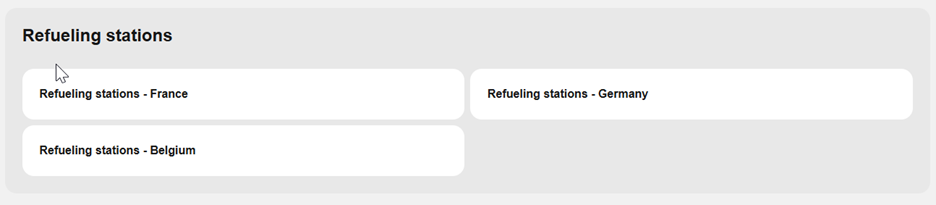
An example of the research object and research object instance use can be explained with the following case: A project needs to implement some research regarding some “Refueling stations”. For the refueling stations there are 3 teams that operate the research in 3 different countries (France, Germany, Belgium).
In this case the “Refueling stations” is the research object entity where all reporting parameters for the research are configured and we have 3 research object instances for each country reporting results. Like so, a different Beneficiary member (Data provider) account can be used to report the results for each country. So, in this case, under the Project page “Technology KPI Monitoring” section the structure would look like this.
Below is a more detailed description for the use of each entity and what is expected from each project role.
Research object
The Research object is the data collection entity where the reporting parameters (TRUST) are selected and configured according to the project needs. This is a page mainly managed by the Project Officer role which will define the required reporting parameters for the project.
Under the research object page, we will find the list of Descriptive and Operational parameters that have been selected for the reporting.
In this page we can find the “Manage Parameters” action button that redirects to the parameters management page where the project parameters can be selected or removed from the research object.
Any project parameters settings changes can also be done by clicking the “arrow” icon at the “Operation” column of each parameter. From this drop-down menu you can click on the “Edit” menu item to open the current parameter settings.
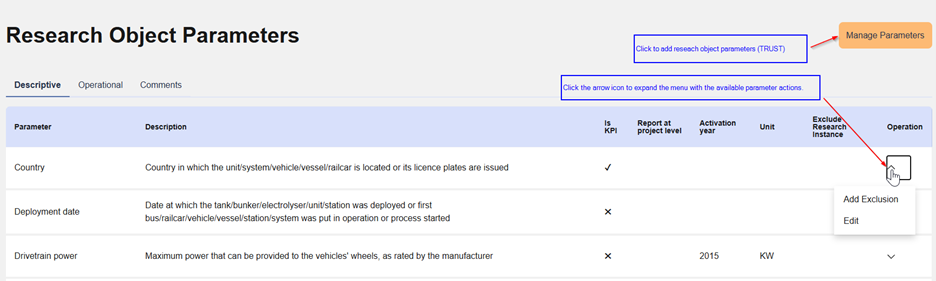
Editing research object parameters settings.
By clicking the “Edit” menu item at the “Operations” column of each parameter we can edit the parameters additional settings for a project. In this form we can find settings for:
- Report at project level: This option allows us to select if we want this parameter to report results at project level based on a selected formula.
- Activation year: In case the parameter is not required from the beginning of reporting, we can set the activation year of the parameter. This option will enable the reporting of this parameter when the activation year is reached.
- Is KPI: Check this option to set the reporting of this parameter as mandatory.
- Is for Poster: Check this option to specify that this parameter will be used for posters.
Description: Override the default parameter description if needed.
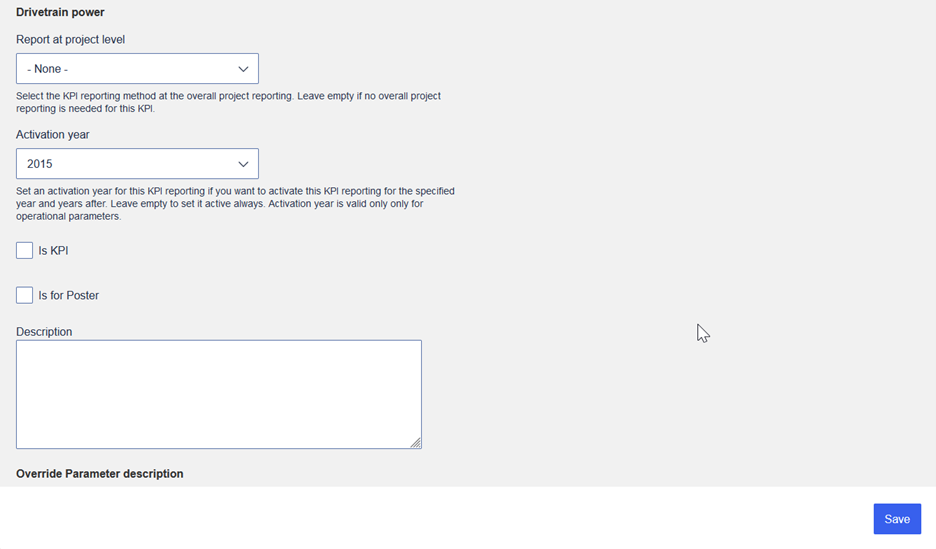
Finally, click on form “Save” to store your changes.