The project poster documents are word documents that can be generated based on a specified poster template in single or multiple selections.
Single generation
The JU user has two ways to generate a single project poster document.
- From the project overview page, click on the action button "Export Poster".
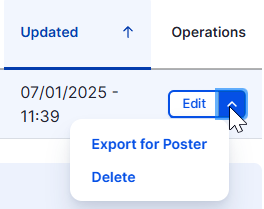
From the project content page https://knowledge.clean-hydrogen.europa.eu/admin/content/projects click at the operation "Export for Poster", available to all project items.
Multiple generation
The JU user can select multiple project items and extract all the poster documents in a single archive file from the projects content page. Navigate to the projects page from the administrator menu Content > Projects or directly from https://knowledge.clean-hydrogen.europa.eu/admin/content/projects URL. Apply and search filters and the click the "select all items" checkbox at the top left of the results table and click 'Filter' if needed.
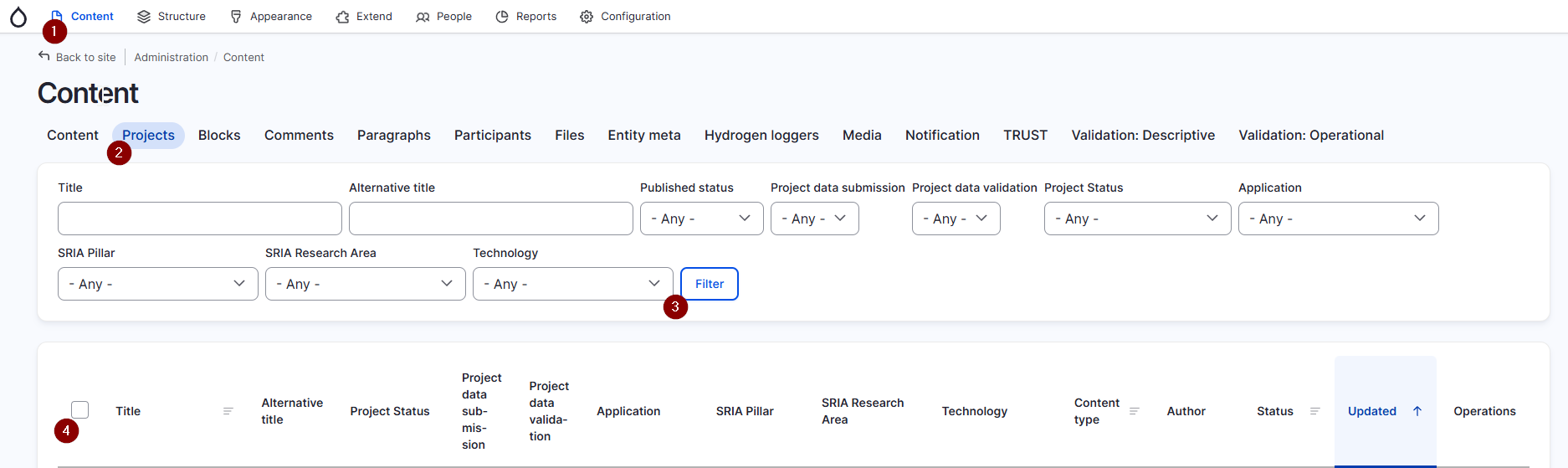
then at the bottom of the table select the "Export poster" action. Select all the table results and click "Apply to selected items".

When the export process is completed, click at the "Download the exports archive here" link to download the posters archive file.